pproach to data extraction: how to design the pipeline, where AI helps (and where it hurts), how to validate quality, and how to integrate extracted data into workflows safely. The goal is not just to extract text. The goal is to produce trustworthy data that teams can act on.

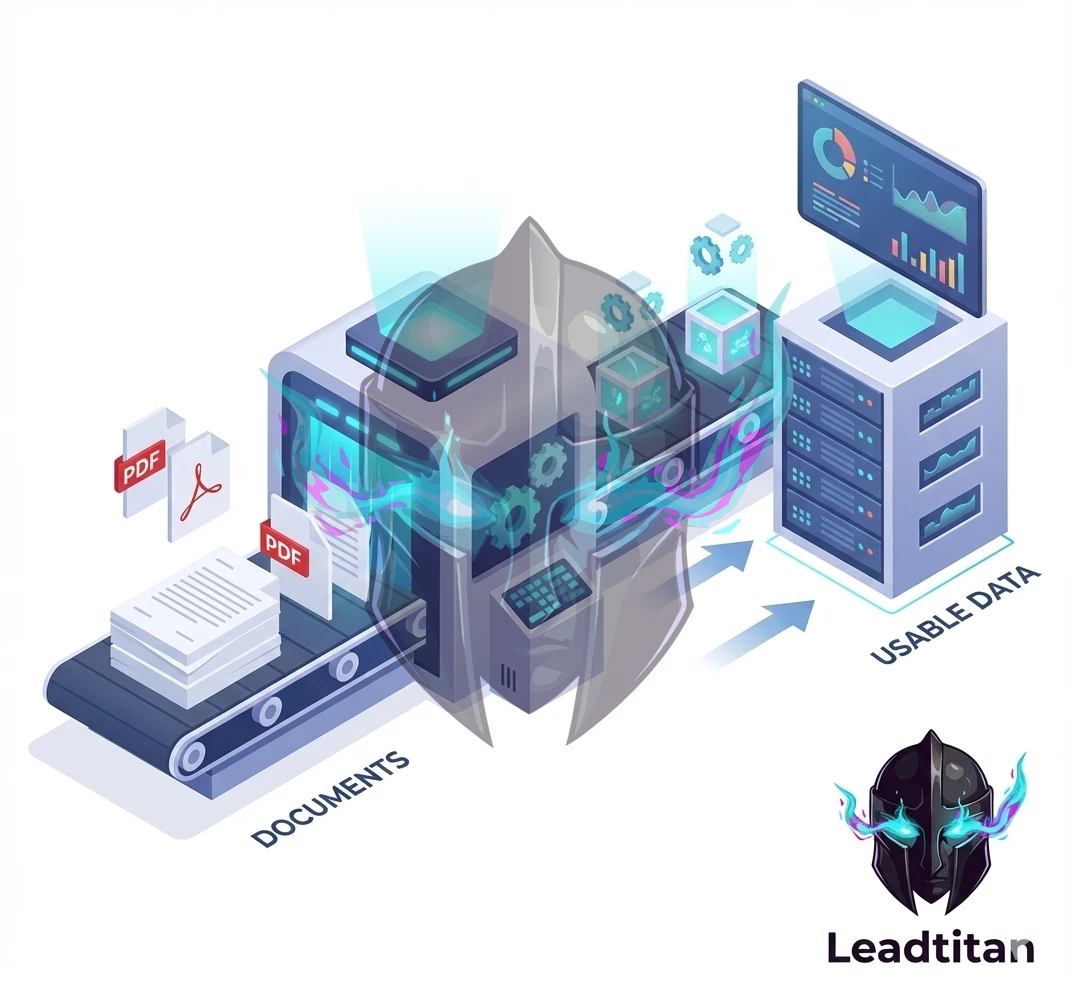
What counts as “data extraction” in real operations
In practice, data extraction covers any process that turns an unstructured input into structured fields. Common sources include:
- Inbound PDFs (contracts, statements of work, invoices, compliance documents).
- Emails and attachments (RFQs, onboarding details, procurement requests).
- Scanned forms or images (handwritten notes, IDs, receipts).
- Chat transcripts and support tickets (issue type, urgency, product area).
- Web forms that capture free-text fields or inconsistent values.
The extracted output is usually a structured record: account, contact, request type, line items, product selections, dates, and compliance flags. The value comes from speed and accuracy: the faster the data becomes usable, the faster the business can respond.
The extraction pipeline: design it like a production system
Many teams treat extraction as a one-off script or an experiment. That fails the moment volume increases or a format changes. LeadTitan designs extraction as a pipeline with clear stages and guardrails.
A practical pipeline includes:
- Ingestion: capture the document, store it securely, and attach metadata (source, timestamp, owner).
- Normalization: convert formats into a consistent representation (text + layout hints where needed).
- Extraction: use rules, templates, or models to extract fields (dates, names, line items).
- Validation: verify required fields, check formats, and apply business rules.
- Enrichment: add missing firmographics, normalize company names, dedupe identities.
- Output: write to CRM, warehouse, or workflow queue with audit logs and links.
Not every pipeline needs every stage, but every pipeline needs validation and observability. Otherwise, errors silently propagate into downstream systems.
Where AI helps (and where it can create risk)
AI can be excellent at extracting fields from messy text, classifying request types, and summarizing long inputs. But AI is not inherently reliable. The key is to use AI where it reduces manual work without creating unacceptable error rates.
High-value AI use cases for extraction:
- Entity extraction: names, addresses, product mentions, invoice numbers.
- Classification: request type, urgency, routing category.
- Normalization: convert messy values into standardized fields (industry, region).
- Summarization: produce a short summary for humans to review quickly.
Where AI can be risky:
- Extracting compliance-critical fields without verification.
- Interpreting ambiguous language as “facts” without confidence scoring.
- Generating missing values instead of marking them as missing.
LeadTitan avoids these risks by pairing AI extraction with validation rules and confidence thresholds, plus human review for high-impact cases.
Quality control: confidence, sampling, and audits
Extraction quality is not a single metric. A pipeline can be “accurate” on average while still failing on the cases that matter most. That’s why quality control must be designed explicitly.
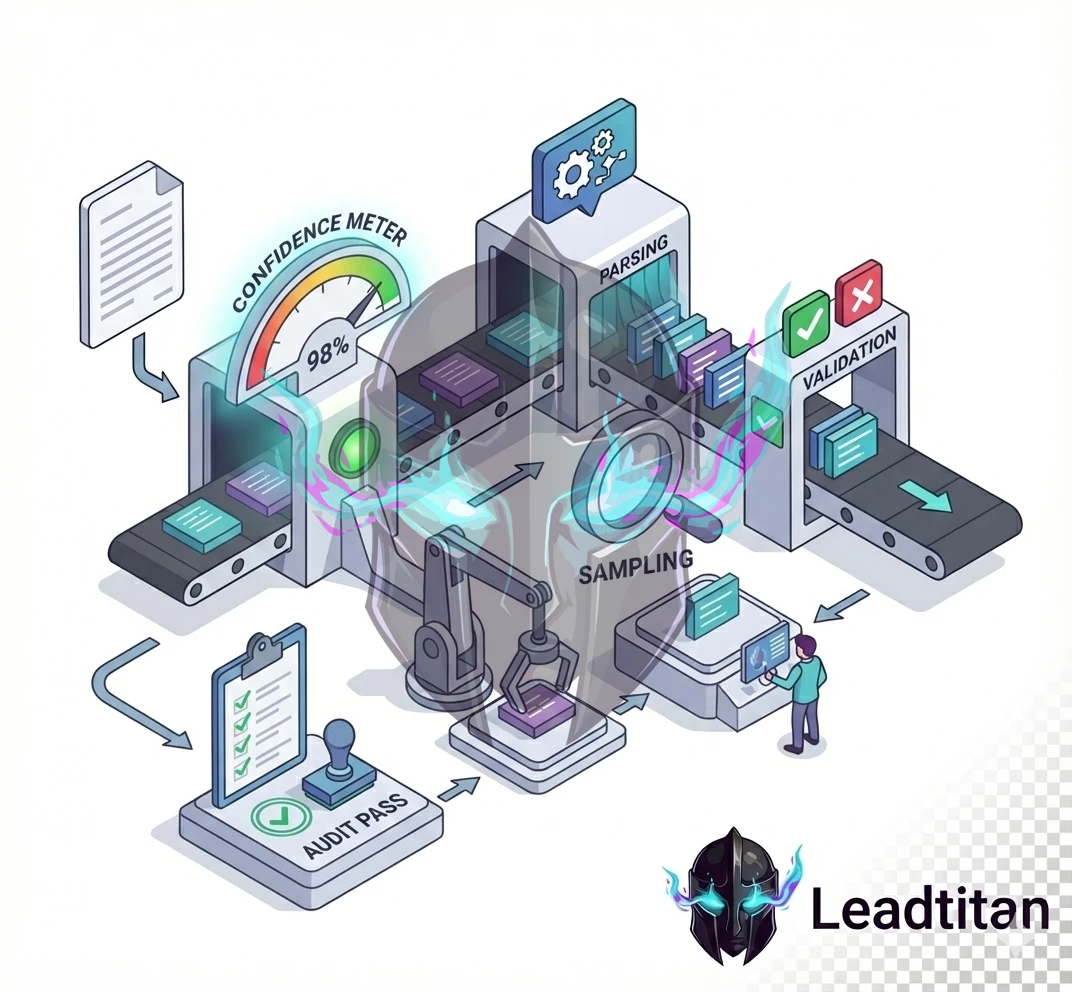
Practical quality controls include:
- Confidence thresholds: route low-confidence extractions to review queues.
- Required fields: block outputs that lack critical fields (or label them as incomplete).
- Sampling audits: review a percentage of outputs weekly to detect drift.
- Golden test sets: a fixed set of documents used to evaluate pipeline changes.
- Error taxonomy: categorize errors (missing, wrong, ambiguous) to guide fixes.
This turns extraction into an operational capability rather than a fragile experiment.
Enrichment: making extracted data immediately usable
Extraction produces fields, but enrichment produces usability. For example, a document might include a company name but not a domain, industry, or region. Enrichment adds those fields and normalizes them to match your CRM definitions. LeadTitan’s enrichment work typically includes:
- Company normalization (standard names, domain matching).
- Firmographic enrichment after consent (industry, employee count, location).
- Lifecycle stage alignment (map extracted signals to your lifecycle model).
- Dedupe logic (merge into existing records instead of creating duplicates).
Enrichment must be governed. Only enrich when you have legal permission and a clear business need. Avoid collecting data “just because you can.”
Integrations: connect extraction to workflows and analytics
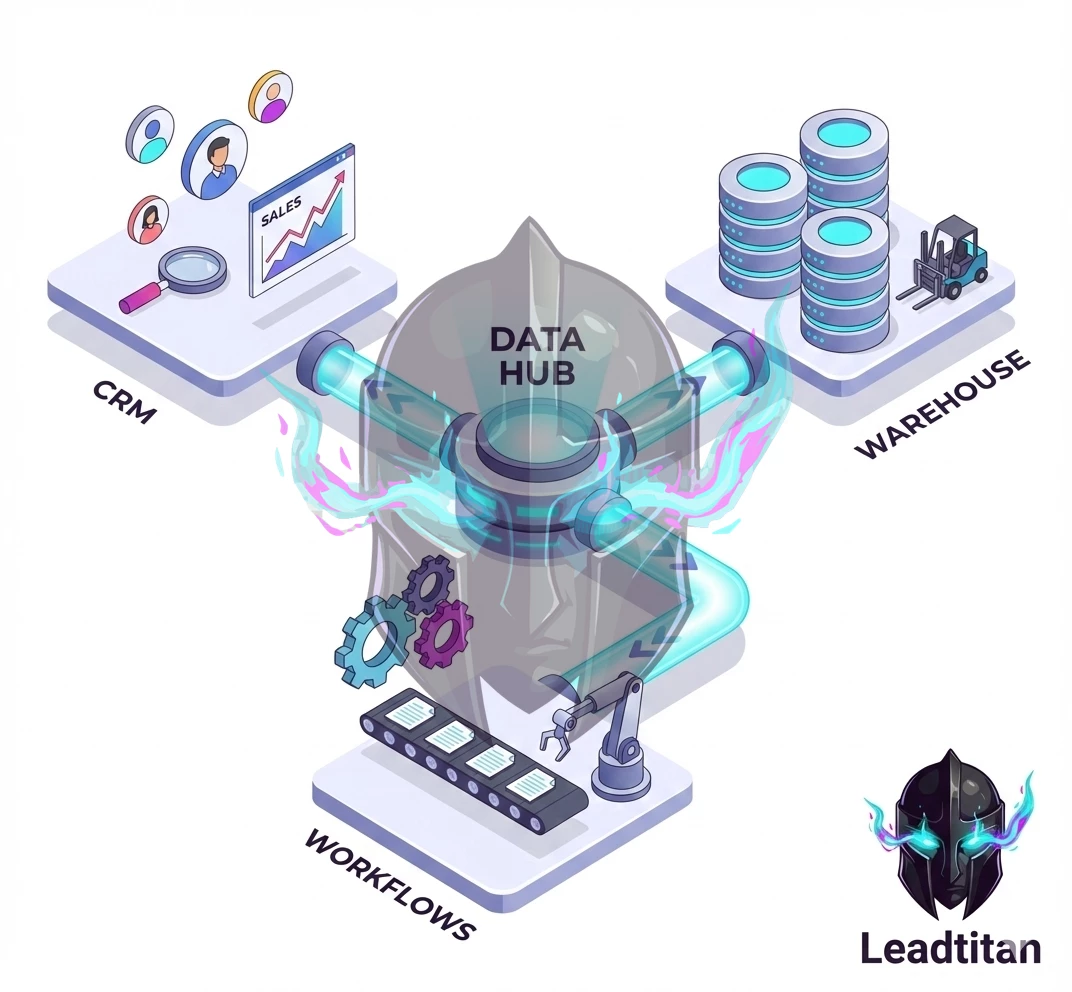
Extraction only pays off when the data reaches the systems that drive action. That means integrating with CRM, ticketing, automation tools, and the data warehouse.
Integration patterns that work well:
- Workflow queues: write extracted records into a queue that triggers routing and notifications.
- CRM upserts: update existing records with extracted fields and attach source links.
- Warehouse events: store extraction results for auditing and analytics.
- Human review UIs: provide a simple interface to approve or correct low-confidence outputs.
When integrations are designed correctly, extraction becomes a lever for faster response and better data quality across the organization.
Security and compliance: treat documents as sensitive by default
Documents often contain sensitive information. LeadTitan’s extraction work includes a security posture that covers:
- Secure storage with access control and retention policies.
- PII masking in logs and model inputs where appropriate.
- Audit trails linking outputs to source documents and extraction versions.
- Deletion workflows that propagate across systems.
Security is not optional. It is the foundation that allows automation to scale without creating unacceptable risk.
Case example: speeding up intake while improving data quality
A common operational pain is intake: RFQs arrive by email with PDFs and partial details. Sales wants speed, ops wants clean records, and support wants context. A LeadTitan pipeline can ingest documents automatically, extract key fields, validate required data, enrich firmographics, and route the request with an SLA. The result is faster response and better data quality because the system reduces manual copying and standardizes fields.
FAQ
Do we need AI to do extraction? Not always. Template-based parsing works well for consistent formats. AI is useful when formats vary or when text is messy, but it must be paired with validation.
How do we measure extraction success? Track field-level accuracy, completeness, time-to-usable-record, and downstream outcomes like response time and routing correctness.
Can we start small? Yes. Start with one document type and one workflow. Ship a measurable improvement, then expand.
How LeadTitan typically engages
LeadTitan data extraction engagements begin with a source inventory and a definition of required fields for one workflow. We then build an ingestion + extraction + validation pipeline with monitoring, and integrate it into CRM and workflow systems so the business outcome is immediate. From there, we add more document types and enrichment rules using the same governance patterns so quality stays high as volume grows.
Start with the schema, not the tool
Extraction projects fail when teams pick tooling first and decide “what good looks like” later. The quickest way to get value is to define the schema and quality rules up front. A simple schema document answers:
- Fields: what data do you need (and what is explicitly out of scope)?
- Types: dates, currency, enums, free text, IDs, and required/optional fields.
- Normalization: formatting rules (phone, address, casing) and unit conversions.
- Validation: what rules make a record “acceptable,” “needs review,” or “reject”?
- Lineage: how will you trace a value back to the original document/page?
Once the schema is clear, you can choose OCR, parsing approaches, and LLM usage based on requirements rather than hype.
Common pipeline patterns (and when to use them)
Different inputs require different strategies. LeadTitan typically mixes approaches based on document type and risk.
- Template parsing: best when the source format is stable (vendor PDFs, standardized forms).
- OCR + rules: best when scans vary but key fields are in predictable locations.
- LLM-assisted extraction: best for semi-structured text, emails, messy notes, and long documents.
- Hybrid: use deterministic parsing for high-confidence fields and LLM for the rest.
A hybrid pipeline is often the most reliable: it keeps costs down and reduces hallucination risk because you only ask a model to do what it’s good at.
Data quality: the real ROI lever
It’s easy to celebrate extraction accuracy in a demo and still fail in production because the downstream system can’t trust the data. Data quality is a product requirement. Practical quality controls include:
- Confidence scoring: per-field confidence and an overall record score.
- Cross-field rules: totals match line items; dates fall in valid ranges; required pairs exist.
- Outlier detection: catch improbable values before they reach CRM/ERP systems.
- Human review queue: a lightweight UI or workflow for low-confidence records.
Governance and security (practical controls)
Extraction often involves sensitive data: customer info, pricing, contracts, medical or financial details. Governance should be designed in from day one.
- Access controls: least-privilege roles for documents and extracted datasets.
- Retention: store source documents only as long as required; define deletion rules.
- Audit logs: track who accessed documents and who approved corrections.
- PII handling: mask fields in logs, exports, and error traces.
- Vendor review: if an LLM/OCR provider is used, confirm data handling terms and options.
Integration strategy: deliver data where it is used
The output format matters because it determines how quickly teams adopt the system. Common delivery mechanisms include:
- CRM updates: create/update leads, companies, deals, and notes.
- Warehouse loads: append new records with lineage for analytics and forecasting.
- Webhook events: send a normalized payload to business systems in real time.
- Files: CSV/JSON exports for teams that need a simple handoff first.
LeadTitan typically recommends starting with the most valuable integration first (the system that drives revenue), then expanding to secondary systems once the pipeline is stable.
Implementation playbook: from pilot to production
- Pilot: 50–200 representative documents and a first-pass schema.
- Baseline: measure precision/recall by field and document type.
- Hardening: add validation, confidence scoring, and exception handling.
- Review queue: implement human-in-the-loop for low-confidence items.
- Monitoring: alert on extraction failures, cost spikes, and quality drift.
- Scale: add more document types and integrations once metrics are stable.
Human-in-the-loop review that doesn’t slow you down
Human review is not a sign of failure; it is a control mechanism that keeps quality high while the system learns. The goal is to review only what needs review, and to make review fast.
- Route by confidence: high-confidence records auto-approve; low-confidence records go to review.
- Show evidence: for each field, show the source snippet or page reference that produced the value.
- Minimize clicks: reviewers should approve most records with one action.
- Capture corrections: store reviewer corrections so rules and prompts can improve.
- Define SLAs: review queues have turnaround targets so downstream teams can rely on the data.
When this pattern is implemented, the pipeline can scale safely because exceptions are handled without blocking the entire system.
Evaluation methodology: measure what matters
“Accuracy” is too vague for production systems. Evaluation should happen at the field level and at the business outcome level. LeadTitan typically tracks:
- Field precision/recall: for critical fields, measure correctness and missing rates.
- Record completeness: percent of records meeting required-field thresholds.
- Downstream acceptance: percent of records that successfully load into the destination system.
- Exception rate: percent routed to review and the top reasons for review.
- Drift: accuracy changes over time as templates and inputs change.
With these measures, you can make informed decisions: add deterministic parsing for one field, improve OCR, or tighten validation rules.
Cost management and scaling
Extraction cost can surprise teams when volume grows or when models are used indiscriminately. Cost control is an engineering requirement.
- Gate expensive steps: only use LLM extraction when simpler methods fail or when the value is high.
- Chunk intelligently: process only the pages/sections likely to contain required fields.
- Cache results: reprocessing the same documents should not repeatedly incur full cost.
- Monitor spend: alerts for cost spikes and anomalous document sizes.
- Scale by document type: expand one document family at a time so quality stays predictable.
Error handling and lineage: make data trustworthy
In production, the hardest part is not extraction; it is diagnosing edge cases quickly. A pipeline should never fail silently, and every record should be traceable back to its source.
- Correlation IDs: every document and every extraction run gets an ID used across logs and exports.
- Dead-letter queues: failures route to a safe place with enough context to replay.
- Replay capability: reprocess a single document with a newer pipeline version to confirm fixes.
- Lineage metadata: store document name, page, and snippet references for critical fields.
- Quality audit trail: capture reviewer edits and why they were needed.
When lineage exists, stakeholders trust the system because you can explain where values came from and how they were validated.
Common edge cases (and how to handle them)
Most extraction pipelines break on a handful of recurring edge cases. Planning for these up front reduces rework and keeps quality stable as volume increases.
- Multiple versions: the same document type evolves over time. Detect version markers and branch logic accordingly.
- Ambiguous fields: two values could be the “right” one. Capture both with evidence and route to review.
- Missing pages: scanned packets arrive incomplete. Fail fast and request re-upload rather than guessing.
- Handwritten notes: treat as low-confidence by default and escalate to a reviewer.
- Low-quality scans: add image cleanup steps (deskew, contrast) and retry OCR with stronger settings.
These controls keep the pipeline honest. When the system cannot be confident, it should say so and route the exception instead of injecting bad data into downstream systems.
Quick starter pack: what to prepare for a fast build
If you want LeadTitan to move quickly on a data extraction workflow, the best input is a small, representative package of materials. This reduces discovery time and makes the first build much more accurate.
- Samples: 20–50 documents across the variants you see in production (new, old, messy, edge cases).
- Target schema: a simple spreadsheet describing each field, type, and whether it’s required.
- Acceptance rules: what counts as “good enough” for each field and which fields must be perfect.
- Destination: where the data should land (CRM, warehouse, ticketing system) and the required format.
- Owners: who reviews exceptions and who signs off on schema changes.
With those inputs, a pilot can deliver usable structured data quickly, and the pipeline can be hardened iteratively with monitoring, validation, and review controls.



Next steps
If you have a document-heavy workflow, the fastest path to ROI is to extract one high-value dataset, validate it with business users, and integrate it into the system that drives daily operations. With the right schema, quality controls, and governance, data extraction becomes a reliable engine for automation rather than a brittle one-off script.